
- English
- Français
- Español
- Deutsch
- Русский
- عربي
- 한국어
- 日本語
- Português BR
- ภาษาไทย
- Tiếng Việt
- 简体中文
- 繁體中文
Add text, image logo or date/time watermarks straight onto your screenshots, batch watermark existing images, and overlay sequence numbers, brush strokes and text annotations, plus emoji and stickers. Also supports standalone capture on desktop, long screenshots and online text recognition (OCR).
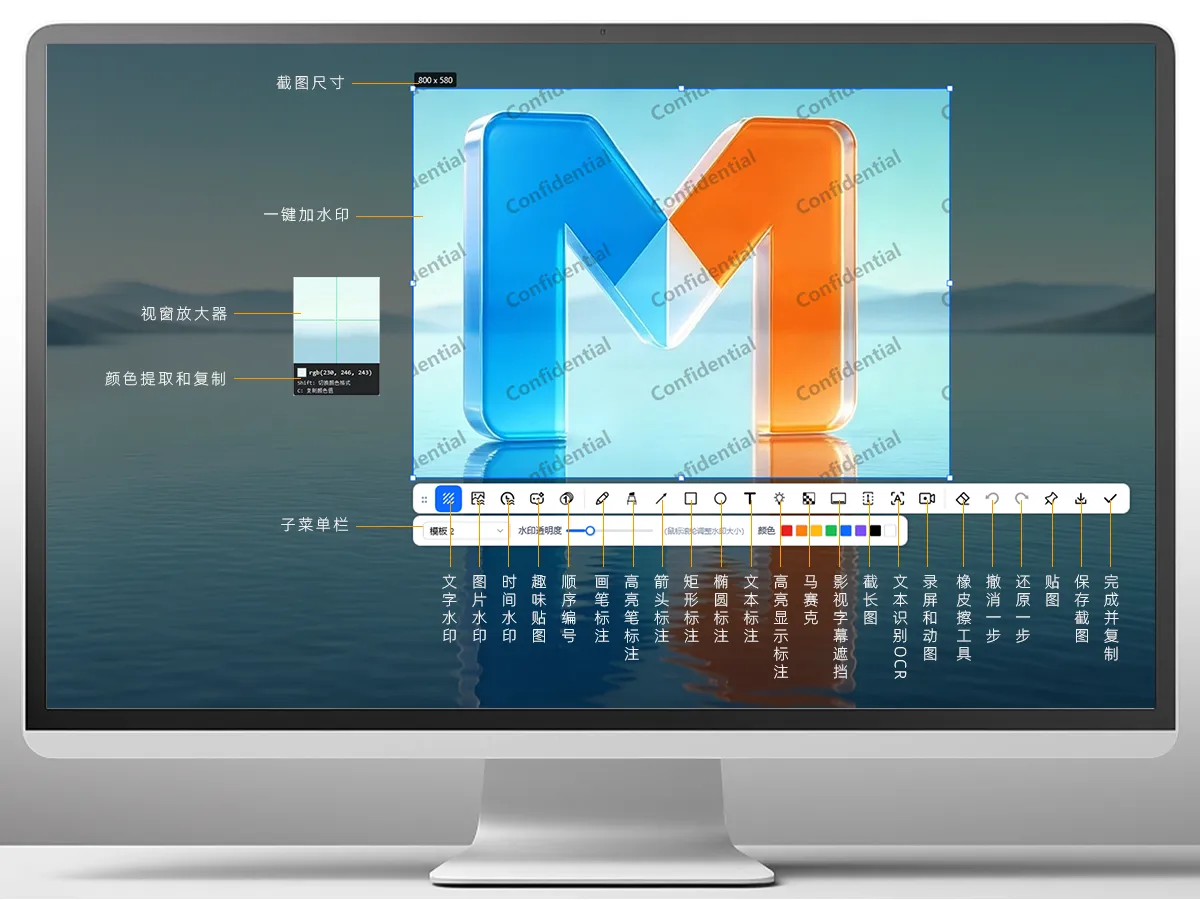

Freely combine text, logo image and date/time watermarks, adjusting color, opacity, size and tiling to your taste; you can even batch watermark and export an entire folder.

Add multiple image files or pick a folder, and MarkPic will automatically apply your own custom watermark to all of them exactly the way you want — no more watermarking one image at a time.

Pin images and image files onto your screen like sticky notes with one click, drag them anywhere for reference, and compare content faster than ever.
Pencils, highlighters, arrows, numbers, spotlight, mosaic — a full row of annotation tools always within reach, in solid, dashed or rounded styles; numbering auto-increments with a click, spotlight highlights what matters, and mosaic blurs sensitive content in one click.
Press F1 by default to launch capture instantly, with automatic detection of windows and page elements — wherever the cursor goes, it snaps, aligning edges perfectly in one go.
Forgot to save a screenshot at home or at work, and can never find it again? No worries — with screenshot history, your captures never get lost!

Want to put your mood into a screenshot? Happy, excited, thumbs-up... or sometimes a little sass — let fun stickers show exactly how you feel!

Need to present a PPT, a courseware deck or a tutorial to others? Doodle / Present / Whiteboard lets you freely display your annotations on screen, so others can follow your lead and listen with ease!
Auto-scroll to stitch ultra-long web pages and chat histories with live preview; pull Chinese, English and handwritten text out of screenshots into plain text with one-click OCR; and yes — it records your screen too!

Probably a world-first design feature — great news for anyone sharpening listening skills with foreign-language movies and series. No more covering your screen with slips of paper or books!

Beyond the headline capabilities above, there are these thoughtful touches too.
Pin screenshots to your screen, then zoom, flip and adjust opacity.
Pixel-level magnified color picking, with one-click RGB/HEX copying.
Freely change the color theme to give your tools a sharper look.
Just right-click an image for "Add watermark / Pin with MarkPic".
Customize hotkeys for capture, pinning and more.
Switch between multiple languages at will — built for a global audience.
Screenshots can be set to auto-save to a folder of your choice.
Always in the system tray — press a hotkey and the frame appears instantly.
Up and running in seconds — capture, watermark and annotate in one smooth flow. Free for personal use, long term.
Supports Windows 10 and Windows 11 (64-bit); just double-click to run after downloading.
Core features such as capture, annotation, three types of watermarks, long screenshots and pinned images work in the free version; advanced capabilities like OCR text recognition and batch watermarking require Pro.
After purchase you will receive an activation code tied to your email. Enter it in "Settings → About" to unlock it — buy once, use it for years to come.
No. Watermarks are rendered as an overlay, so the original pixels stay untouched, and both opacity and size are fully adjustable.
Scroll slowly and steadily, keeping an eye on the live preview. If you see a "Scrolling too fast" prompt, scroll back a little and it will pick up again.